Document Management on Kubernetes: Deploying Paperless-ngx
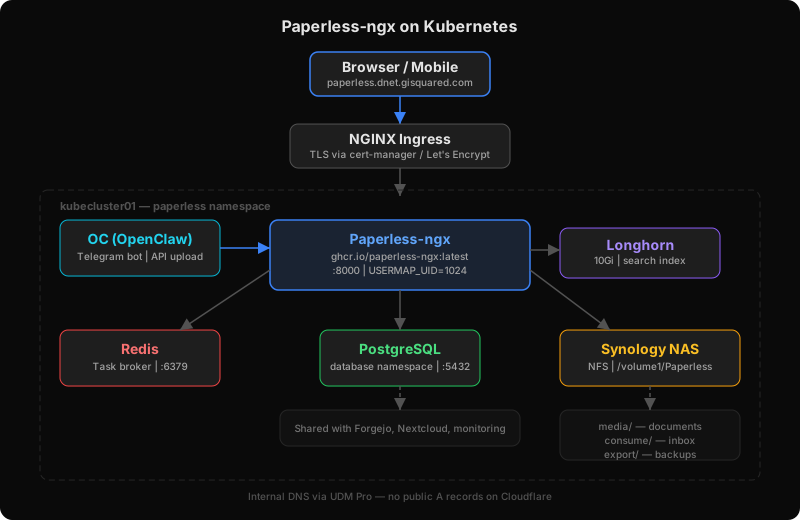
I’ve been looking for a way to manage household documents — receipts, business docs, real estate paperwork — without relying on a cloud service. Nextcloud was on the shortlist, but with Immich already handling photos, Nextcloud felt like overkill. All I really needed was a system to ingest, OCR, and organize documents.
Enter Paperless-ngx.
Why Paperless-ngx
It does one thing well: document management. You scan or upload a document, it OCRs the text, auto-tags it based on content, and makes everything full-text searchable. It’s lightweight, has a clean web UI, supports multiple users (my wife gets her own account), and has a REST API for automation.
No file sync, no calendar, no contacts — just documents.
The Architecture
Paperless-ngx runs on my 5-node RKE2 cluster alongside everything else:
- Paperless-ngx — main app, single replica
- Redis — task broker for background OCR processing
- PostgreSQL — shared instance in a dedicated database namespace (same one backing Forgejo and other apps)
- NFS on Synology NAS — document storage (media, consumption folder, exports)
- Longhorn — 10Gi block storage for the search index and classification models
Ingress is the same pattern as my other services — NGINX with TLS via cert-manager and Let’s Encrypt. Internal only — no public DNS records.
How It Got Built: CC Did the Heavy Lifting
The entire deployment was done through CC (Claude Code) in a single terminal session. I described what I wanted — household document management, multi-user, AI-friendly API — and CC:
- Researched Paperless-ngx’s architecture, container images, storage requirements, and Helm chart options
- Planned the deployment — chose raw manifests over Helm (matching my existing pattern), shared PostgreSQL over a dedicated instance, NFS on the NAS for document storage
- Wrote all 8 manifest files — namespace, secrets, storage (NFS PV + Longhorn PVC), Redis, ConfigMap, Deployment, Service, Ingress
- Deployed to the cluster, diagnosed and fixed issues in real-time:
- Synology NFS permission hell (more on that below)
- Kubernetes service env var collision crashing the web server
- Django
ALLOWED_HOSTSrejecting readiness probes
- Created the admin account, set up DNS, verified via Playwright
From “let’s deploy Paperless” to a working instance with login — one conversation. No Googling, no copy-pasting from forums, no YAML-by-hand. CC read the error logs, understood the root cause, and fixed it. That’s the workflow I want for all infrastructure.
The Synology NFS Gotcha
This was the fun part. Paperless-ngx’s init system tries to chown its data directories on startup to match the configured user ID. On a normal filesystem, no problem. On a Synology NAS via NFS? Problem.
Synology uses a proprietary ACL system (syno-ACL) that sits above the NFS layer. Even with “Map all users to admin” or “no_root_squash” enabled in the NFS permissions, the ACL layer blocks chown operations. The NFS squash settings you think are working? The ACL overrides them before they ever take effect.
The fix was simple once we understood the root cause: set USERMAP_UID to 1024 — the UID that Synology maps all NFS operations to. Since the container process runs as the same UID the files are owned by, there’s no need to chown anything. The directories are writable because the UIDs match.
No need to disable ACLs, no special NFS mount options. Just match the UID.
Another Kubernetes Classic
There was one more gotcha. When you create a Kubernetes Service named paperless, Kubernetes auto-injects an environment variable called PAPERLESS_PORT with the full service URL (tcp://10.43.x.x:8000). Paperless-ngx also uses PAPERLESS_PORT — but expects an integer.
The web server would crash on startup trying to parse a URL as a port number. The fix: explicitly set PAPERLESS_PORT: "8000" in the ConfigMap so it overrides the Kubernetes-injected variable.
This is one of those issues that’s obvious in hindsight but takes a minute to spot in the logs.
The AI Workflow: OC + Paperless
This is where it gets interesting. Within hours of Paperless going live, OC (my Telegram AI assistant) had API access and was uploading documents for me.
The workflow: I snap a photo or forward a PDF in Telegram. OC uploads it to Paperless via the REST API, reads the OCR’d text, and smart-tags it. Not just basic tags — OC reads the actual content and creates structured summaries.
Here’s how it works in practice. I sent a photo of an old paystub. OC filed it and came back with:
Filed and tagged: tax, paystub
Last paystub of the year. YTD breakdown:
Amount Salary $85,000 Bonus $8,500 RSU $12,000 Gross $112,400 Federal withheld $18,200 401k EE $10,500 Net $58,300 *Values are fictitious for privacy — the real interaction parsed and structured the actual figures from the document.
Then when I sent the matching W-2, OC cross-referenced it against the paystub it had already filed:
Your tax return shows $128K in wages but this W-2 shows $105K. The $23K difference — did you have a second W-2 that year? Maybe from a job change or severance?
That’s a real interaction. I sent two documents, and without being asked, OC spotted that the numbers didn’t add up across records and asked me about it. It’s reading documents, connecting the dots, and flagging discrepancies on its own.
Within a day, Paperless had 50+ documents across 25 tags — tax returns, W-2s, 1099s, brokerage statements, invoices, real estate docs, mortgage records. All OCR’d, searchable, and organized. The filing cabinet I’ve been avoiding for years? Digitized in an afternoon.
The Full Pipeline
Photo/PDF → Telegram → OC (AI assistant)
                         ↓
                    Paperless-ngx API
                         ↓
                    OCR + Archive (PDF/A)
                         ↓
                    OC reads text, smart-tags
                         ↓
                    Searchable, organized, done
And if I need to find something later: “OC, find my property tax docs” — it queries the Paperless API and returns results. No digging through folders.
What’s Next
The ML-based auto-classification will only get better with more data. Paperless learns your patterns after ~30 manually tagged documents — we’re already past that threshold. OC’s smart-tagging is handling the heavy lifting for now, but eventually Paperless’s own classifier will start suggesting tags on its own.
The combination of a purpose-built document manager (Paperless) + an AI assistant with context (OC) + infrastructure automation (CC) is the workflow I didn’t know I needed. Each piece does one thing well, and they compose naturally through APIs.
Self-hosted, internal only, no cloud dependencies. Just how I like it.